SKU:PNI-LK-HUNTC
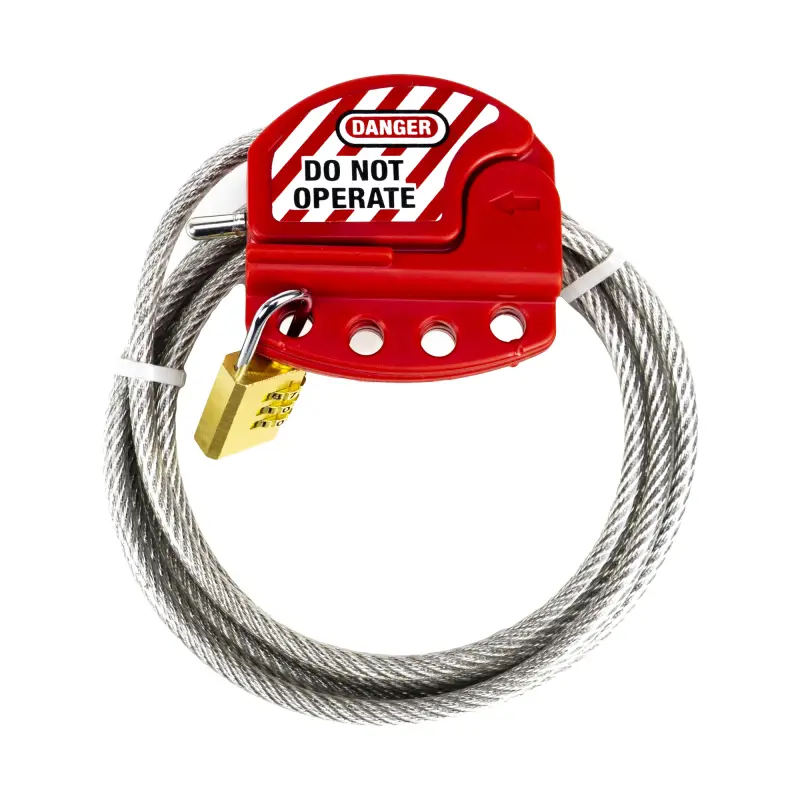
Image is for illustrative purposes only

2 meter long security cable with padlock for PNI hunting cameras
Increased safety for hunting cameras and more The PNI SmartLock security cable brings a high degree of security to protect hunting cameras placed in the forest, on trees or in any other location. Being a security system, it can also secure other goods such as bicycles, scooters, etc.
Simple locking system with padlock The locking system is simple and allows the 2-meter-long steel rope to be locked in the special carabiner. The included padlock is removable and allows changing the unlock code extremely easily. Of course, the padlock can be replaced with other similar locking solutions as needed.
Lock configuration The lock comes with the factory unlock code 0-0-0. Align the 0 of the 3 wheels with the red line on the lock to unlock the lock. To lock, bring the lock to the closed position and randomly turn the 3 wheels. Change padlock code 1. Unlock the padlock: Adjust the 3 number wheels so that the zero (0) is collinear 0-0-0 with the red line on the padlock. 2. Pull the padlock tab vertically to open it and rotate the tab 180 degrees counterclockwise. 3. Press the ear of the padlock into its body. 4. With the lock ear pressed, change the 3 wheels to obtain another password, as desired. Write down the password in a notebook or special place for passwords to remember it in case you forget it. 5. Release the lock tab and rotate it 180 degrees back to the original locked position. Rotate the 3 rollers to lock the lock. The procedure is successful and you have now changed the password. Verify the password and open the lock with the new password. If you want to change the password again, repeat the steps above.
Increased safety for hunting cameras and more The PNI SmartLock security cable brings a high degree of security to protect hunting cameras placed in the forest, on trees or in any other location. Being a security system, it can also secure other goods such as bicycles, scooters, etc.
Simple locking system with padlock The locking system is simple and allows the 2-meter-long steel rope to be locked in the special carabiner. The included padlock is removable and allows changing the unlock code extremely easily. Of course, the padlock can be replaced with other similar locking solutions as needed.
Lock configuration The lock comes with the factory unlock code 0-0-0. Align the 0 of the 3 wheels with the red line on the lock to unlock the lock. To lock, bring the lock to the closed position and randomly turn the 3 wheels. Change padlock code 1. Unlock the padlock: Adjust the 3 number wheels so that the zero (0) is collinear 0-0-0 with the red line on the padlock. 2. Pull the padlock tab vertically to open it and rotate the tab 180 degrees counterclockwise. 3. Press the ear of the padlock into its body. 4. With the lock ear pressed, change the 3 wheels to obtain another password, as desired. Write down the password in a notebook or special place for passwords to remember it in case you forget it. 5. Release the lock tab and rotate it 180 degrees back to the original locked position. Rotate the 3 rollers to lock the lock. The procedure is successful and you have now changed the password. Verify the password and open the lock with the new password. If you want to change the password again, repeat the steps above.
General features
Color: Gray with Red
Accessory type: Security cable with padlock
Cable length: 2 meters
Cable material: Steel
Cable diameter: 6 mm
Color: Gray with Red
Accessory type: Security cable with padlock
Cable length: 2 meters
Cable material: Steel
Cable diameter: 6 mm
-
 WILLFINE-T4.0CG100265.00 €Customer price251.75 €-5%